

Most brands arrive at influencer planning with the same problem. There’s a campaign date in the diary, creators are being discussed, and someone has opened a spreadsheet. But the spreadsheet already carries too much pressure. It’s expected to solve targeting, timing, approvals, compliance, performance tracking, and reporting at once.
That’s where good influencer marketing companies separate themselves from the rest. They don’t start with posting dates. They build a calendar that works as an operating system for the campaign. In the UK market, that means balancing creative freedom with commercial structure, and doing it in a way that stands up to scrutiny from stakeholders, finance teams, and regulators.
A strong calendar isn’t just a production tool. It tells the team what the campaign is trying to achieve, which creators are responsible for what, when content needs review, how disclosure will be handled, and what success will look like after the campaign goes live.
Laying the Strategic Foundation Before You Build
A calendar without strategy becomes an admin document. It may look organised, but it won’t help a brand decide which creators to brief, what content to prioritise, or how to judge results.
That matters because influencer marketing now sits under far more commercial scrutiny than it did a few years ago. Influencer marketing delivers an average of $5.78 per $1 spent in 2025, and 61% of consumers trust influencer endorsements more than traditional advertising, according to Sprinklr’s influencer marketing statistics. If a channel can perform at that level, the planning standard has to rise with it.

Start with one commercial objective
The first decision isn’t which influencer marketing companies to shortlist. It’s whether the campaign is trying to drive awareness, consideration, conversion, content generation, or credibility.
Too many calendars fail because brands ask one campaign to do everything. A launch plan built for awareness needs reach, frequency, and repeated message exposure. A conversion plan needs stronger product framing, tighter offer tracking, and cleaner attribution. A trust-building programme needs consistency over time, not a burst of disconnected sponsored posts.
A practical way to pressure-test the objective is to ask one question: what will the business team care about when the campaign ends?
- If brand teams need visibility, the calendar should prioritise creator fit, posting cadence, and message consistency.
- If ecommerce teams need sales, every creator entry needs a trackable route to action such as a UTM or code.
- If PR teams need social proof, the calendar should include usage rights, whitelisting decisions, and asset collection.
- If a new market is the priority, the creator list should reflect local relevance, not just headline follower counts.
Practical rule: one primary objective drives the calendar. Secondary goals can sit underneath it, but they can’t compete with it.
Choose KPIs that reflect the brief
Once the objective is fixed, the KPI selection gets easier. At this stage, weak planning often shows. Teams choose metrics because they’re visible, not because they’re meaningful.
Engagement rate can be useful. Reach can be useful. Saves, comments, clicks, code redemptions, and lead quality can all matter. None of them matter equally in every campaign.
A calendar should only track metrics that help the team make decisions while the campaign is still live or improve the next one. If a column won’t change behaviour, it probably doesn’t belong in the sheet.
A clean KPI stack usually looks like this:
| KPI layer | What it answers | When it matters most |
|---|---|---|
| Primary KPI | Did the campaign achieve the commercial goal? | End of campaign |
| Diagnostic KPI | Why did performance move up or down? | During and after campaign |
| Operational KPI | Is delivery on track? | Before and during launch |
That distinction stops teams from flooding the calendar with noise.
Build content pillars before content ideas
Leading influencer marketing companies rarely brief creators from a blank page. They define a small set of content pillars first. These are the repeatable themes that keep creator output consistent without making it feel scripted.
For a beauty brand, pillars might include routine integration, ingredient education, and social proof. For travel, they might be itinerary utility, booking confidence, and in-destination experience. For sport, they often centre on performance context, lifestyle fit, and community identity.
The point isn’t to make every post look the same. It’s to make sure every post pushes the same strategic direction.
Brands that need help mapping campaign objectives into repeatable creator formats often find it useful to review practical influencer use cases, especially when deciding whether the brief is better suited to launch support, ongoing advocacy, or creator-led content production.
Decide the non-negotiables early
Before the calendar exists, the team should agree the rules creators must work within. These usually include:
- Mandatory messages that must appear in content.
- Creative boundaries such as claims to avoid or visual restrictions.
- Approval rules covering draft review and sign-off.
- Usage rights so repurposing doesn’t become a legal or budget issue later.
- Platform priorities based on where the audience is most likely to respond.
This is also the point where many brands decide whether they need outside operational support. Some teams manage everything internally. Others use influencer marketing services to handle creator sourcing, briefing, negotiation, and campaign management when internal bandwidth is tight.
The best calendars don’t rescue weak strategy. They make strong strategy executable.
Designing Your High-Impact Influencer Content Calendar
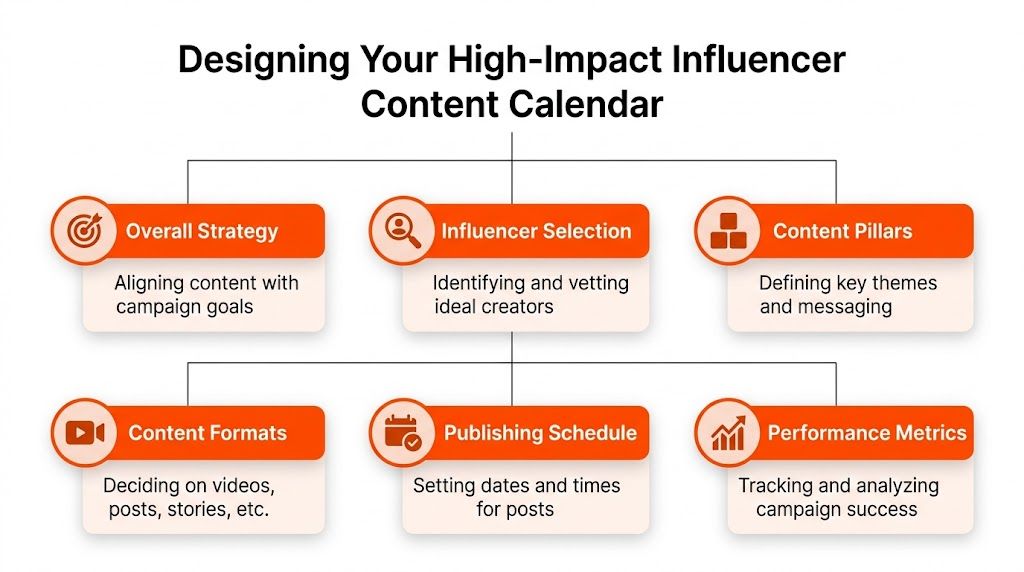
The best campaign calendars are built less like content planners and more like production systems. Every column should answer one of three questions. What is happening, who owns it, and how will it be measured?
That structure matters even more in the UK, where disclosure standards can’t be treated as a final check before posting. Recent ASA data from Q4 2025 showed a 47% increase in upheld complaints against UK influencer ads for misleading transparency, while compliant campaigns delivered 22% higher trust and 18% better engagement in UK beauty and lifestyle sectors, according to Business of Apps on influencer marketing.
The essential columns that actually earn their place
A high-functioning calendar doesn’t need dozens of tabs. It needs the right fields in the main working view.
Here’s the core structure many influencer marketing companies use:
- Campaign and creator identifiers. Include campaign name, influencer name, platform, creator tier, and talent contact. This stops version confusion when multiple briefs are live.
- Content planning fields. Add content pillar, post format, draft concept, key message, CTA, and product focus. These fields keep strategy tied to execution.
- Timing controls. Use draft due date, review date, feedback return date, publish date, and contingency date. Without these, deadlines can slip.
- Commercial tracking. Include agreed fee status, invoice status, UTM link, promo code, usage rights, and paid amplification suitability.
- Compliance fields. Add disclosure label required, compliance check complete, restricted claims, and final approval owner.
- Performance fields. Reserve space for live URL, reach, engagement, clicks, sales or leads, and post-campaign notes.
The compliance fields deserve special attention. A campaign can look creatively strong and still create avoidable risk if no one has explicit ownership of disclosure review.
Add a compliance checkpoint, not a compliance reminder
A lot of calendars include a note that says “remember #ad”. That isn’t enough.
The calendar should include a binary compliance status so the team can see immediately whether each post is cleared for publication. A useful setup looks like this:
| Field | Why it matters |
|---|---|
| Disclosure label required | Confirms the exact paid partnership wording expected |
| Compliance check complete | Shows whether someone has reviewed the post before go-live |
| Risk notes | Captures category-specific issues such as claims or sensitive language |
| Final approver | Assigns accountability clearly |
That last field saves time. If no one owns the final decision, approval gets delayed or guessed.
A calendar entry should make it impossible to ask, “Who was supposed to check this?”
Build views for different teams
One master sheet is fine. One master view usually isn’t.
Account managers need timeline visibility. Creative teams need concept and draft status. Paid media teams care about which assets can be amplified. Legal or compliance reviewers need disclosure and claims fields surfaced first.
Filtered views in Airtable, Notion, Monday.com, Asana, or even Google Sheets prove useful. The same underlying record can appear in different ways without duplicating data. For brands evaluating tools beyond a spreadsheet, this kind of workflow often overlaps with broader platform decisions, including creator discovery, relationship management, and reporting. A practical starting point is comparing influencer marketing platforms against the team’s actual process rather than buying software for features that won’t be used.
For structure inspiration, teams often borrow useful layouts from broader publishing workflows. These social media editorial calendar examples are helpful because they show how to separate ideation, approvals, and publishing without turning the calendar into clutter.
Keep the calendar strict where it matters and flexible where it helps
A common mistake is over-engineering the sheet before the first creator is contracted. The calendar should be strict on dates, compliance, ownership, links, and approvals. It should stay flexible on content angles and creator expression.
That balance matters because creators don’t produce their best work from rigid scripting. But a brand also can’t afford a workflow where captions, tracking links, and labelling are treated as optional.
A useful test is simple. If a field protects performance, governance, or timing, keep it mandatory. If it exists only because someone might want it later, move it out of the core view.
Populating and Customising the Calendar for Live Campaigns
A blank calendar looks tidy. A live one looks crowded, negotiated, and slightly imperfect. That’s normal. Once creators start confirming, products are being shipped, and briefs come back with revisions, the calendar becomes a working campaign document rather than a planning template.
The way it gets populated depends on the type of campaign. A product launch and an always-on programme shouldn’t be loaded into the sheet in the same way.

Example one with a UK beauty launch
For a beauty launch, the calendar usually works backwards from one immovable moment. Product availability. That means the first entries aren’t publish dates. They’re product send dates, briefing windows, draft deadlines, and review slots.
A practical beauty launch sheet often groups creators into waves:
- Tease wave for early anticipation
- Launch wave for coordinated visibility
- Proof wave for usage, results, and follow-up reminders
Each wave can use different creator roles. Some are there to create excitement. Some explain application or benefits. Others give the campaign staying power after launch-day noise fades.
For this type of campaign, the calendar often needs extra fields such as shade selection, product receipt confirmation, and claim sensitivity. TikTok entries may need a sound or trend reference field. Instagram Reel entries may need hook line and cover frame approval fields. YouTube Shorts may require a product demonstration note. The format changes, so the sheet should change with it.
Example two with an always-on travel programme
Travel works differently. The challenge isn’t synchronisation. It’s consistency.
An always-on travel campaign calendar is usually built around recurring themes rather than a single launch date. One creator may post around itinerary utility. Another may focus on destination realism. A third may cover family suitability or seasonal relevance. The sheet should make those roles visible so content doesn’t collapse into repetition.
The commercial importance of creator tier decisions becomes clear. In UK travel and sports, micro-influencers under 50k followers deliver 3.5x higher engagement rates than macro creators at 8.2% versus 2.1%, and return £4.20 per £1 spent, up from £3.80 in 2024, partly due to a 28% rise in authentic UGC post-iOS privacy updates, according to Influencer Marketing Hub’s analysis of micro-influencer marketing agencies.
That data changes how a calendar should be populated. Instead of allocating most rows to a few bigger names, many travel and sports programmes perform better when the sheet is built around a larger set of niche creators with distinct audience relevance.
Smaller creators usually need more coordination and less persuasion. The calendar has to account for that extra operational load.
Custom fields by platform and campaign type
A useful way to customise the calendar is to think in layers.
The first layer is universal. Creator, date, asset, approval, tracking, compliance.
The second layer is platform-specific. TikTok may need trend context, creator spark ad permission, and native text overlay notes. Instagram may need story frame count, link sticker inclusion, and pinned comment guidance. YouTube may need title alignment and longer lead time for edits.
The third layer is campaign-specific. A retail push might need store location fields. A hotel campaign may need check-in dates and booking windows. A supplement campaign might need stricter benefit language checks.
For teams still building a creator shortlist, this stage usually exposes a discovery problem. A calendar can only stay clean if the right talent is being added from the start. That’s why many brands sort creator sourcing before the schedule is fully built, using processes similar to those outlined in this guide on how to find influencers.
Don’t load every creator the same way
The most practical customisation isn’t technical. It’s operational.
Creators need different levels of structure. Some only need a light brief and a publishing window. Others need draft milestones and multiple stakeholder reviews. Some deliver polished content reliably. Others need more hands-on management but may still be worth it because their audience fit is strong.
A live calendar should reflect that difference. If every row follows the same process regardless of creator behaviour, the team either wastes time or loses control.
Integrating and Automating Your Calendar Workflow
Most campaign calendars break down at handoff points. The strategist updates the sheet, but the account manager doesn’t see the change. The creator manager has the latest draft, but legal reviews an older file. The paid team wants to amplify a post, but no one marked whether rights were cleared.
That’s why the calendar should sit at the centre of the workflow, not on the edge of it.
Connect the calendar to task management
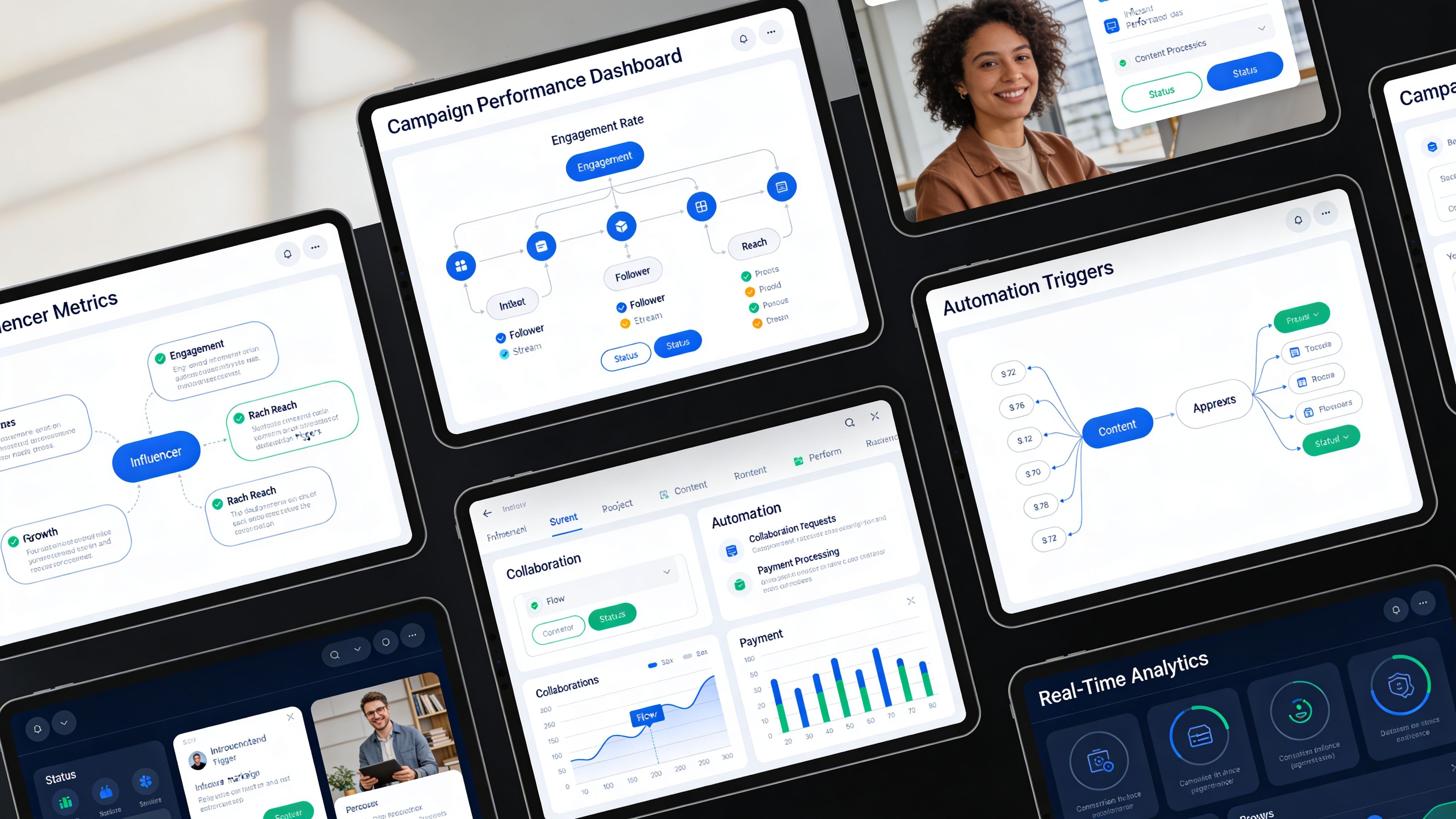
Airtable, Notion, Monday.com, and Google Sheets can all work as calendar layers. What matters is what happens when a row changes status.
If a draft due date is added, the project tool should create a review task. If a publish date moves, the client-facing timeline should update. If compliance status isn’t complete, the team should get a visible blocker rather than finding out on launch morning.
Common operational links include:
- Asana or Trello for approval tasks and dependencies
- Slack for deadline reminders and status alerts
- Google Drive or Dropbox for asset storage linked to each creator row
- Looker Studio or platform dashboards for pulling reporting into one place
- Zapier or native automations for moving data between tools without manual copying
This doesn’t need to be complicated. Even a simple trigger from spreadsheet status to Slack reminder can remove a lot of avoidable chasing.
Make status changes do something
The strongest workflows treat each status as an action point.
“Brief sent” can trigger a follow-up date. “Draft received” can notify the reviewer. “Approved” can alert the paid media team to prepare amplification. “Posted” can prompt link validation and performance tracking.
That model reduces the hidden admin that slows campaigns down. It also lowers the risk of one person becoming the only human who knows what’s happening.
The calendar shouldn’t just store information. It should move work forward.
Keep one source of truth
Automation only helps if the data is trusted. If the creator manager keeps one version, the brand manager keeps another, and reporting sits somewhere else, the team ends up reconciling documents instead of managing performance.
A single source of truth usually means one master calendar with controlled fields, clear owners, and linked views for each team. It doesn’t mean every discussion has to happen inside that tool. It means the final answer to “What’s the current status?” should live in one place.
This is also the point where some brands decide to formalise operating support rather than just creator outreach. For teams that need a partner to manage planning, talent coordination, and campaign workflow, Colossal Influence provides consultancy and delivery across those parts of the process through its UK-based agency offering.
Build for scale, not just the current campaign
A one-off campaign can survive on manual effort. A calendar system can’t.
If the brand intends to run launch campaigns, seasonal pushes, and ongoing creator activity, the setup has to support repeated use. That means standard naming conventions, reusable templates, consistent field definitions, and archived learnings that can be carried into the next cycle.
The most useful workflow upgrade is often the least dramatic one. Fewer duplicate files. Fewer manual reminders. Fewer mystery approvals.
Using Calendar Data to Measure Success and Optimise
A campaign calendar earns its real value after posts go live. Before launch, it creates order. After launch, it shows what happened and why.
That only works if the sheet was built to capture decision-grade data in the first place. Likes and comments on their own rarely explain enough. The useful layer sits underneath them. Which creator drove qualified traffic, which message angle got stronger saves or clicks, which format stalled, which approval delays hurt posting momentum, and which partnerships deserve another run.
Turn the calendar into an analysis view
Once content is live, the working calendar should shift into a reporting lens. The same rows can now answer different questions.
A practical review usually starts by sorting creators into performance groups:
| Performance view | What to look for |
|---|---|
| Strong commercial performers | Clear click, code, lead, or sales contribution |
| Strong engagement performers | High response but weaker conversion path |
| Strong content performers | Assets worth reusing in paid or owned channels |
| Operational risks | Late drafts, poor communication, compliance friction |
This prevents one average from hiding what each creator was good at. A creator can be weak for direct conversion and still be valuable for credibility or content quality. The calendar should make that obvious.
Use UTMs and codes as proof, not decoration
A lot of teams add UTMs and unique codes because they know they should. Fewer teams use them rigorously enough to compare creator performance properly.
That discipline matters in the UK. A rigorous methodology built around UTMs and unique promo codes has become a key benchmark for campaign measurement. In UK beauty, nano-influencers achieve 8 to 12% engagement, and campaigns using this method can reach 30 to 420% above-target engagement. In sports and travel, lead generation costs sit at £60 to £150 per qualified lead, outperforming paid ads by 35%, according to Influencer Hero’s guide to key influencer metrics.
That benchmark is useful for one reason. It forces accountability. If a campaign can’t tie creator activity to traffic, leads, or redemptions, optimisation becomes guesswork.
A simple post-campaign review should ask:
- Which creator drove the strongest response per objective
- Which format produced the cleanest path to action
- Which content pillar repeated across top-performing posts
- Where the funnel broke, such as strong clicks but weak landing page follow-through
- What operational issue reduced performance, such as late approvals or missing links
Strong reporting doesn’t reward the loudest creator. It rewards the clearest contribution.
Look for patterns, not just winners
The point of measurement isn’t only to rank creators. It’s to improve the next brief.
If educational hooks repeatedly outperform lifestyle-led intros, the next calendar should assign more of that content. If one creator tier gives better lead quality, budget allocation should change. If story frames drive intent but Reels drive discovery, the plan should split roles instead of expecting one asset to do both jobs.
This is where a reporting layer or dashboard becomes useful. Teams that want a cleaner way to pull campaign data together often use an Influencer Marketing Dashboard approach to combine live links, traffic, conversions, and creator-level comparisons in one place.
Brands that want to benchmark future creator partnerships more systematically often pair campaign reporting with broader evaluation of social influence and audience fit. That’s where services focused on social media influencer strategy can support planning, measurement, and creator selection at the same time.
Feed the findings back into the next calendar
A campaign shouldn’t end with a report deck that gets filed away. The next calendar should start with the previous one’s conclusions already built in.
That means carrying forward:
- creator reliability notes,
- top-performing hooks and formats,
- compliance issues to avoid,
- stronger timing windows,
- and revised KPIs where the original brief was too broad.
That loop is what separates routine activity from actual programme building. The calendar stops being a schedule and becomes a record of how the brand learns.
Frequently Asked Questions About Influencer Calendars
Most operational problems don’t come from strategy. They come from timing, ownership, and tool choice. These are the questions brand teams usually need answered once the planning starts to become real.
How far ahead should a brand build the calendar
Far enough ahead to source creators properly, issue briefs, manage approvals, and leave room for changes without forcing rushed content. Launch campaigns usually need firmer backwards planning because product delivery, claims review, and approval windows create dependencies. Always-on activity benefits from a rolling calendar that can be updated continuously instead of rebuilt from scratch.
The right lead time also depends on creator type. Some talent can turn content quickly. Others book work further in advance and need more structured scheduling.
Should a team use Google Sheets or dedicated software
Both can work. Google Sheets is fine when the campaign is relatively lean, the stakeholder group is small, and the workflow is still being proven. Airtable, Monday.com, Notion, and creator platforms become more useful when the team needs filtered views, approvals, automations, and cleaner reporting.
The decision should follow operational complexity, not fashion. A simple campaign in an expensive system is still a simple campaign. A complex one in a weak sheet becomes hard to control.
How often should the calendar be updated
It should be updated whenever a real status changes. Weekly updates aren’t enough if drafts are arriving daily or publish dates are moving. A stale calendar creates more confusion than no calendar because teams assume the information is reliable when it isn’t.
That’s one reason many influencer marketing companies now build lightweight automations into the process. The global influencer marketing industry reached $32.55 billion in 2025, up from $24 billion in 2024, with 80% of brands maintaining or increasing budgets and 92% using or open to using AI tools in their workflows, according to PR Newswire’s 2025 influencer marketing data release. As teams run more programmes at once, manual upkeep becomes harder to sustain.
What should happen when an influencer misses a deadline
The calendar should already contain the answer. Each creator row should include fallback timing, key dependency dates, and an owner responsible for escalation. Without that, a missed draft becomes a scramble.
In practice, teams usually need three options:
- Move the publish date if the campaign can absorb the delay
- Swap creator order if another approved asset is ready
- Replace the slot if the deadline affects a critical launch moment
The right option depends on the campaign objective. A launch may need strict replacement. An always-on programme may rebalance timing.
How much detail is too much in one calendar
Too much detail is anything that doesn’t influence action. If a field won’t change planning, approval, compliance, or reporting, it probably belongs in notes rather than the main sheet.
A useful calendar is detailed enough to run the campaign without creating a second system beside it. Once teams start maintaining shadow documents, the calendar has become too heavy or too vague.
Brands that need a more structured way to plan creator partnerships can work with Colossal Influence on influencer strategy, talent management, campaign delivery, and reporting workflows suited to UK market requirements.
Follow us on Social Media


